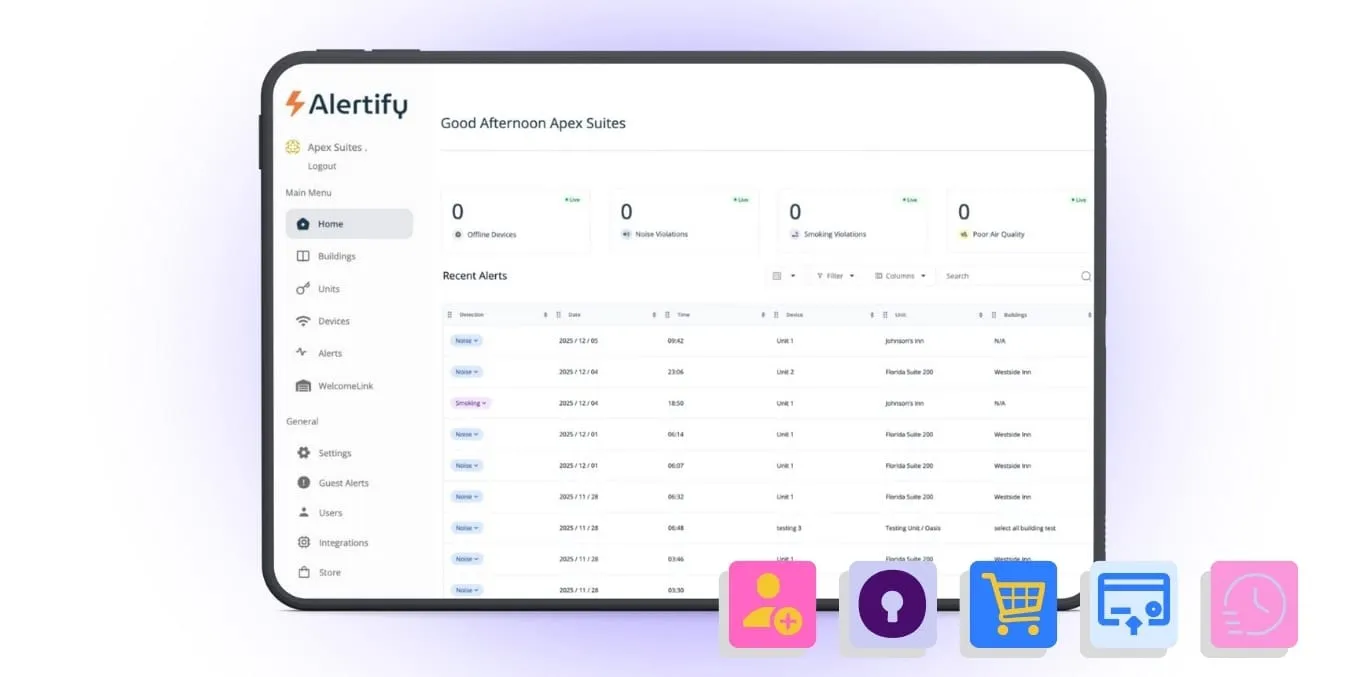
We’re thrilled to announce the launch of our completely redesigned Alertify Dashboard – a comprehensive upgrade that transforms how you monitor, manage, and protect your short-term rental properties. After months of development and incorporating valuable feedback from hosts like you, we’ve built a platform that delivers greater control, enhanced visibility, and streamlined efficiency at every level.
Whether you’re managing a single property or an entire portfolio, these new features give you the tools to work smarter, respond faster, and scale with confidence.
What’s New? A Complete Overview
Enhanced Table Functionality Across Your Entire Dashboard
We’ve reimagined how you interact with data throughout the platform. Every table in your dashboard now offers powerful customization options that let you work the way you want:
- Custom Column Display allows you to show or hide columns based on what matters most to your workflow. Focus on the metrics you need and eliminate visual clutter from information you don’t.
- Improved Reordering makes organizing data intuitive – simply click any column heading to reorder instantly, helping you spot trends and prioritize actions at a glance.
- Drag & Drop Columns give you complete control over your workspace layout. Rearrange columns to match your preferred workflow and create a dashboard that feels tailor-made for how you work.
The benefit? Less time searching for information, more time acting on it. Your dashboard adapts to your needs, not the other way around.
Buildings Management: Your Command Center for Multi-Unit Properties
Say goodbye to toggling between individual units. Our all-new Buildings Management feature gives you unprecedented visibility and control across entire properties.
How It Works
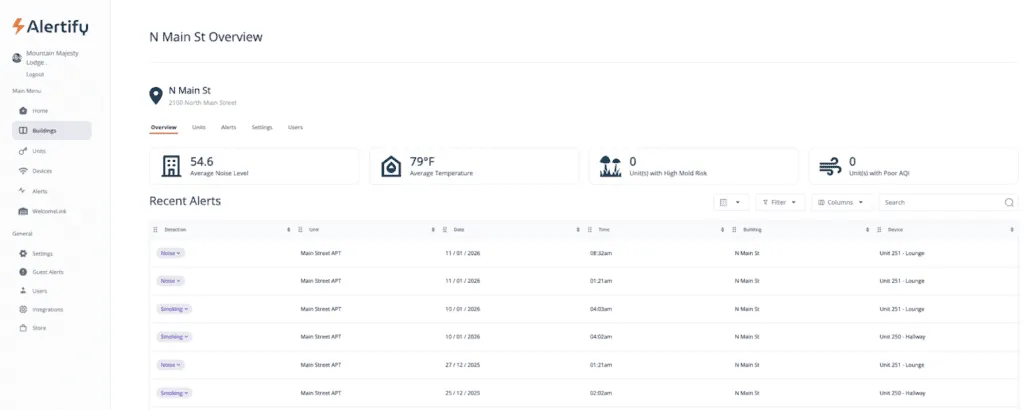
Click on any building name to access a comprehensive overview page that displays critical metrics at a glance:
- Average Noise Level across all units
- Average Temperature throughout the property
- Units with High Mold Risk requiring attention
- Units with Poor AQI that may need intervention
The Recent Alerts View consolidates alerts from every unit within a building, giving you immediate insight into property-wide issues without clicking through individual units.
Comprehensive Unit Overview
Drill down into any building to see detailed information for all units including device status, vacancy/occupancy status, current decibel levels, particulate matter levels, air quality, mold risk, temperature, and CO2 levels – all on one screen.
- Guest Information Integration takes this further: when your Property Management System is connected, occupied units automatically display guest details right where you need them, eliminating the need to cross-reference multiple platforms.
- Feature Status Indicators let you quickly see whether Guest Alerts or WelcomeLink are enabled for each unit, ensuring your protection systems are active where they should be.
Custom Building Settings: Set Once, Apply Everywhere
Perhaps the most powerful feature is the ability to set custom monitoring thresholds and standards for an entire building. Define your parameters once, then apply them across all units for consistent protection and standardized responses.
The benefit? Manage portfolios efficiently without sacrificing granular control. See everything that matters in seconds, not minutes.
Users Feature: The Right Access for Every Team Member
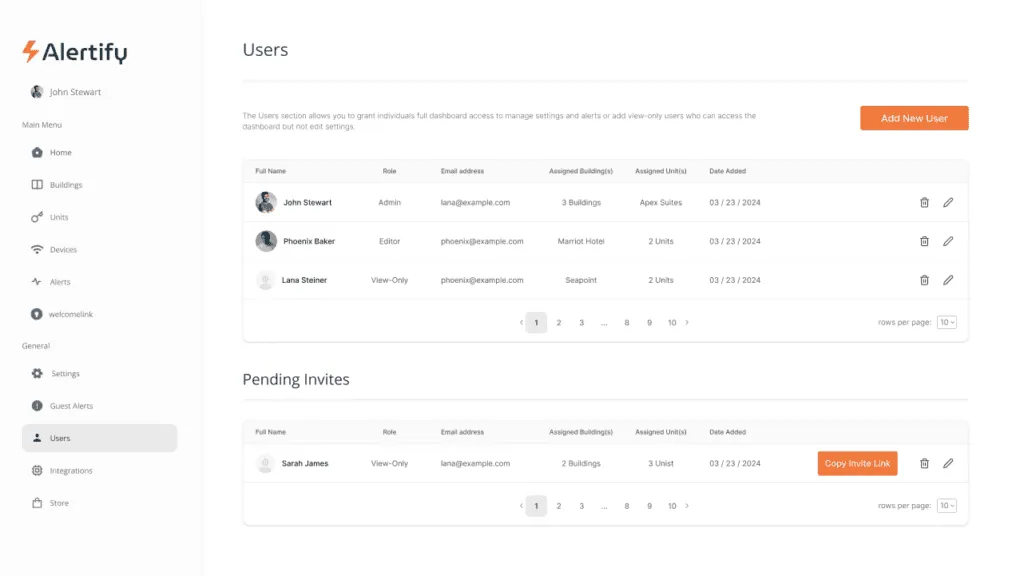
Property management is a team sport, and now your dashboard reflects that reality. Our brand-new Users feature lets you grant secure, role-appropriate access to everyone who needs visibility into your properties.
Three User Roles Designed for Your Team
- Admin Access provides full dashboard control including settings management, user administration, and complete system configuration. Perfect for property managers and owners who need unrestricted access.
- Editor Access gives trusted team members the ability to make operational adjustments and edit settings without full administrative privileges. Ideal for co-hosts, assistant managers, or operations staff who need to respond to alerts and modify monitoring parameters.
- View-Only Access offers limited dashboard visibility to assigned buildings and units only – perfect for property owners, investors, stakeholders, or cleaning teams who need to stay informed without the ability to change settings.
Secure, Separate Credentials
Each user receives their own login credentials, ensuring you can confidently share access with investors, co-hosts, maintenance teams, or cleaning staff without compromising security or risking accidental setting changes.
The benefit? Collaborate without compromise. Give your team the access they need while maintaining security and control over your monitoring system.
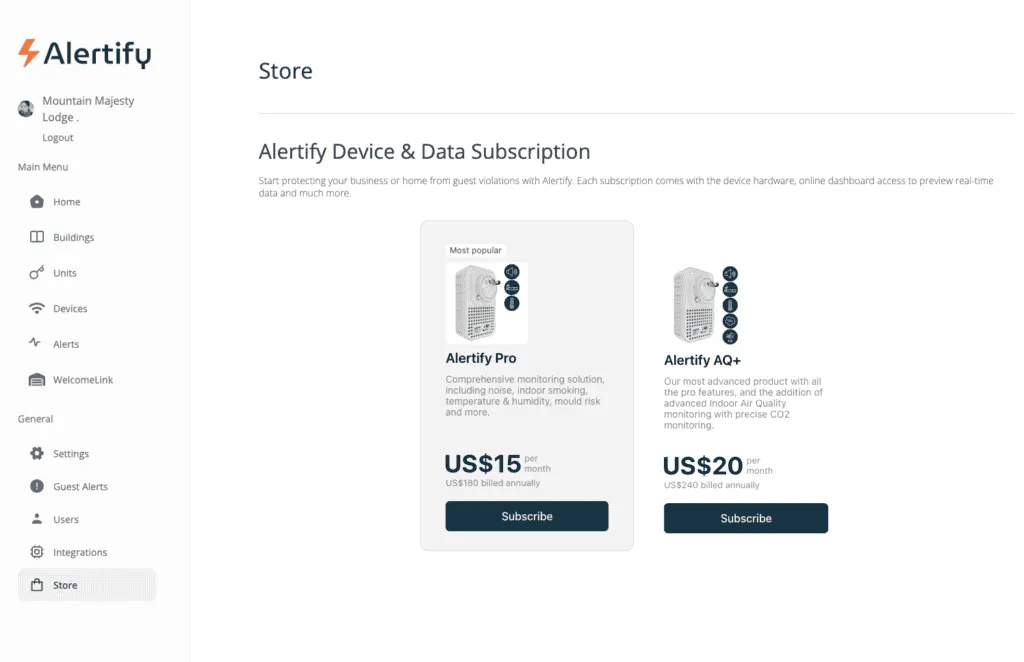
Streamlined Store: Order Devices Without Leaving Your Dashboard
Expanding your monitoring coverage has never been easier. Our redesigned Store page is now accessible directly from your dashboard, eliminating the friction of external ordering processes.
How It Works
- Dashboard Store Access lets you purchase Alertify devices without leaving your workspace. No more switching between platforms or losing your place in your workflow.
- Faster Checkout features an intuitive, redesigned experience that reduces steps and simplifies ordering. Get what you need with fewer clicks and less hassle.
- Saved Payment Details allow you to securely store payment information for lightning-fast future purchases. When you need to expand quickly, you can reorder with just one click.
- Hassle-Free Device Ordering makes scaling your monitoring system as simple as it should be. Whether you’re adding one device or outfitting an entire new property, the process is straightforward and efficient.
The benefit? Scale your portfolio without administrative headaches. Order devices in seconds and get back to what matters.
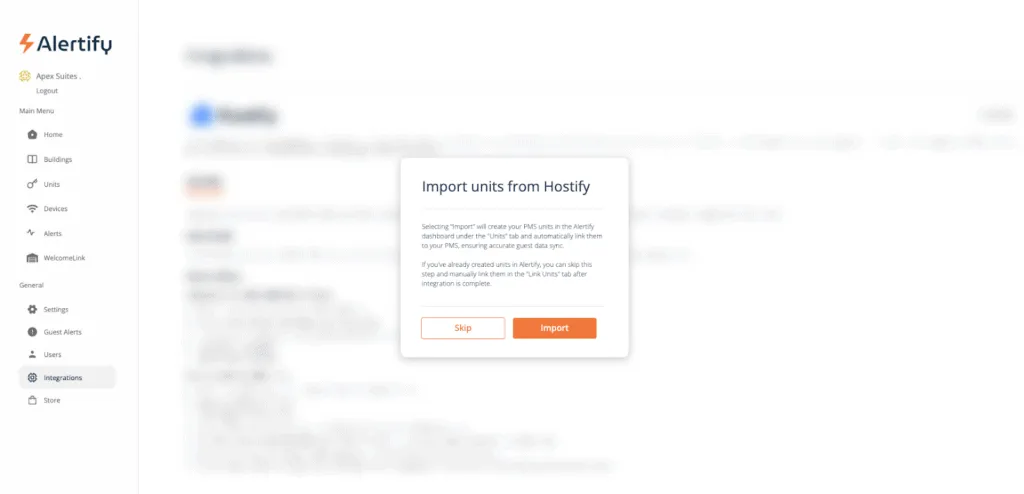
Integrations: Seamless PMS Connectivity
We’ve streamlined how Alertify connects with your existing Property Management System.
Automatic Unit Import
When integrating with a PMS, you can now choose to automatically import your PMS units into Alertify. This instantly creates and connects your units without manual setup, eliminating hours of tedious data entry and reducing the risk of configuration errors.
The benefit? Get up and running faster with less manual work. Your systems talk to each other so you don’t have to play middleman.
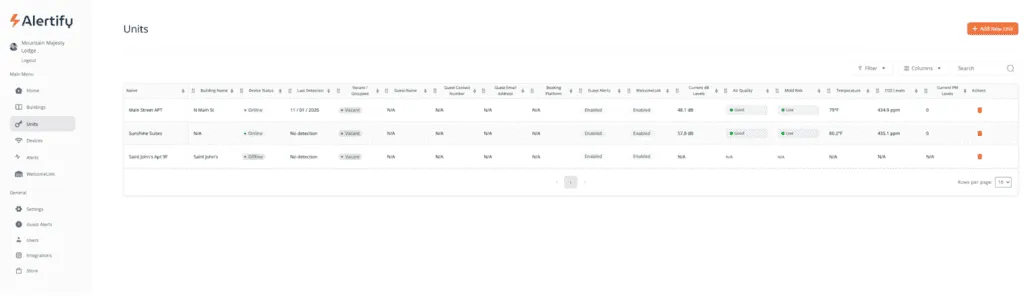
Units Management: Enhanced Visibility and Granular Control
The Units Management section has been significantly upgraded to provide comprehensive information and flexible configuration options.
Enhanced Unit Table Data
Your units table now displays everything you need to know at a glance: vacancy/occupancy status, guest information with booking platform source, Guest Alerts status, WelcomeLink status, current decibel levels, air quality, mold risk, temperature, CO2 levels, and current particulate matter levels.
Flexible Settings Options
Choose whether to use default building settings or create custom settings unique to each individual unit. This gives you granular control over monitoring parameters when certain units require different thresholds than others.
Connectivity Notifications Control
Previously always active, connectivity notifications can now be toggled on or off for each unit. Customize which units trigger connectivity alerts based on your priorities and reduce notification fatigue.
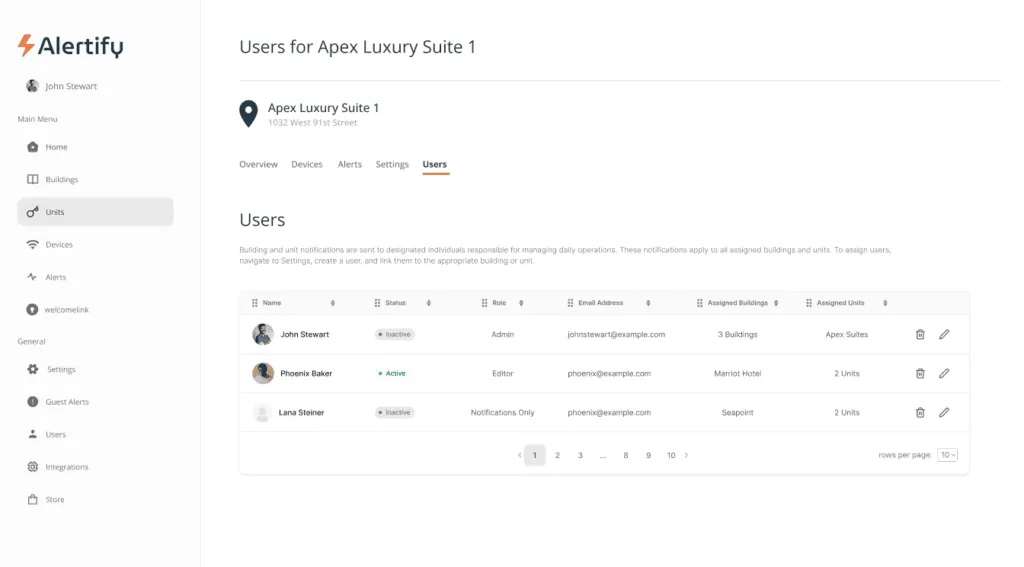
User Assignment Overview
View all users assigned to a unit, including their account status, role, and which units and buildings they can access. This provides complete visibility into access management and helps you audit permissions across your portfolio.
The benefit? Know everything about every unit instantly, with the flexibility to manage them individually or collectively based on your needs.
Home Page Enhancements: Faster Navigation
We’ve made your homepage more functional with Quick Unit Access. Click directly on any unit’s name from the homepage to instantly view detailed violation data for that specific unit, streamlining your workflow and reducing navigation steps.
The benefit? Respond to issues faster by eliminating unnecessary clicks between you and the information you need.
Alerts: Better Visualization and Workflow
The Alerts section features Updated Graphs & Reports with improved visualizations and reporting interfaces for better data analysis and presentation.
Incident Reports in New Tab functionality allows you to open incident reports in a new browser tab by right-clicking the ‘Download incident report’ button and selecting ‘Open link in new tab.’ This lets you maintain your current dashboard view while reviewing detailed reports.
The benefit? Analyze data more effectively and multitask efficiently without losing your place.
Notifications: Take Control of Your Alert Preferences
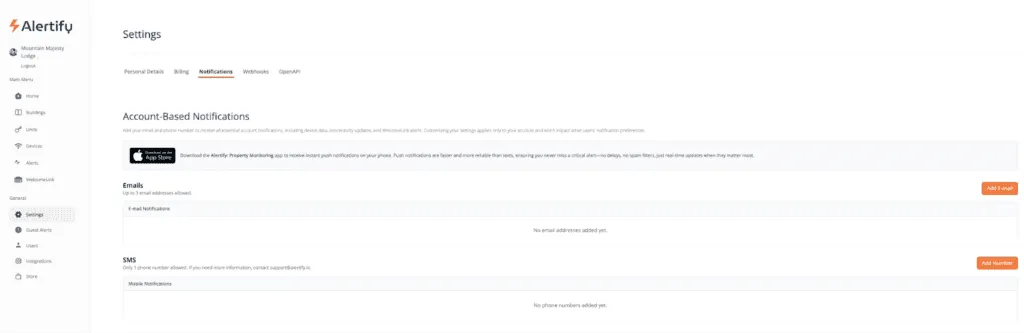
Our enhanced Notifications system gives you unprecedented control over what you receive, where you receive it, and when.
Granular Notification Control
Select specific notification types to receive: Noise, Smoking, Temperature, Mold Risk, Tamper Detection, or Connectivity alerts. Only get notified about the issues that matter most to your operation.
Building/Unit-Specific Notifications
Choose to receive notifications for all buildings and units, or customize notifications for specific properties only. Perfect for managers handling multiple portfolios who need different alert protocols for different clients.
Channel Customization
Decide which notifications you want to receive via email and which via SMS. Prioritize critical alerts for immediate text notification while routing less urgent updates to email, reducing notification fatigue and ensuring you stay responsive to what matters most.
The benefit? Stay informed without being overwhelmed. Get the right alerts through the right channels at the right time.
WelcomeLink: Smarter Guest Verification and New Revenue Opportunities
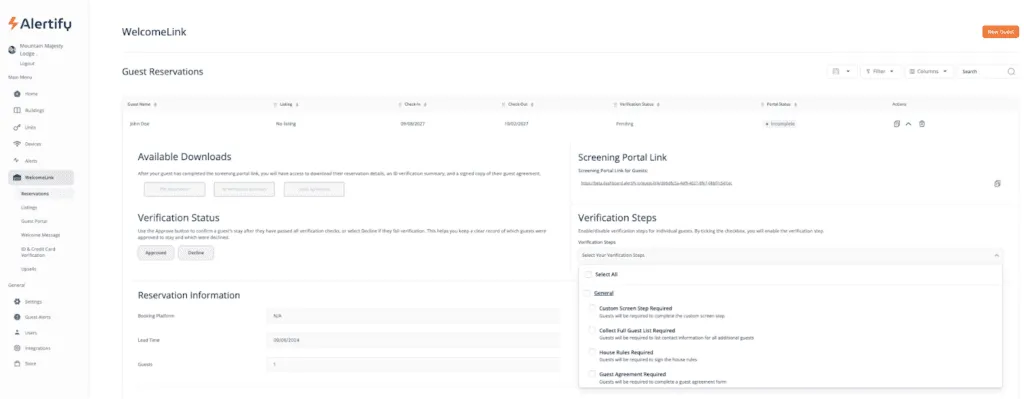
WelcomeLink has been significantly enhanced with features that give you more control over guest verification and new opportunities to generate additional revenue.
Reservation-Specific Verification
Turn verification steps on or off for individual reservations using a convenient dropdown menu on each reservation report. Perfect for adjusting requirements based on booking source, guest history, or reservation length.
Security Deposit Collection
Collect required security deposits from guests through Stripe integration. Set your preferred deposit amount and collect funds via authorization hold before check-in. Funds are securely held and automatically released within three days after checkout, protecting your property while providing guests with a smooth experience.
Flexible Upsell Pricing
Offer upsells with multiple pricing models including one-time payments, per-night charges, and incremental pricing options. Create revenue opportunities from early check-in, late checkout, parking, pet fees, or premium amenities with pricing structures that match your business model.
Bulk Enable/Disable
Need to make property-wide changes? Activate or deactivate WelcomeLink across all listings simultaneously, saving time when implementing new policies or seasonal adjustments.
The benefit? Protect your properties, generate additional revenue, and maintain flexibility, all while providing guests with a professional verification experience.
Guest Alerts: Simplified Management
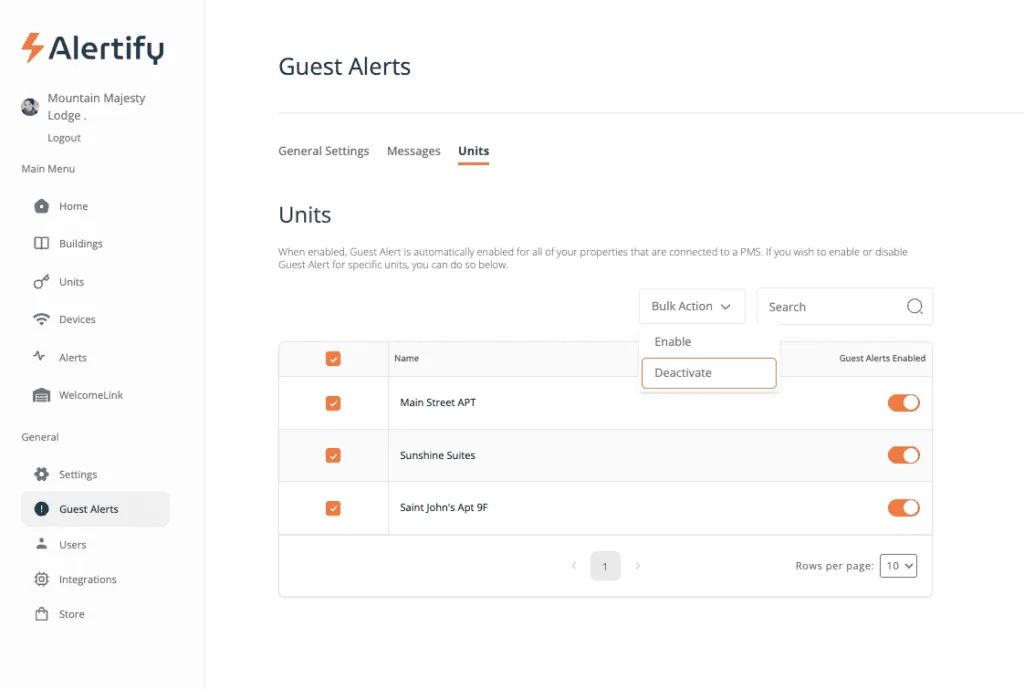
Bulk Enable/Disable functionality allows you to turn Guest Alerts on or off for all of your listings at once, streamlining property-wide notification management when you need to make system-wide changes quickly.
The benefit? Manage your entire portfolio’s guest communication settings in seconds, not minutes.
Webhooks: Targeted Team Communication
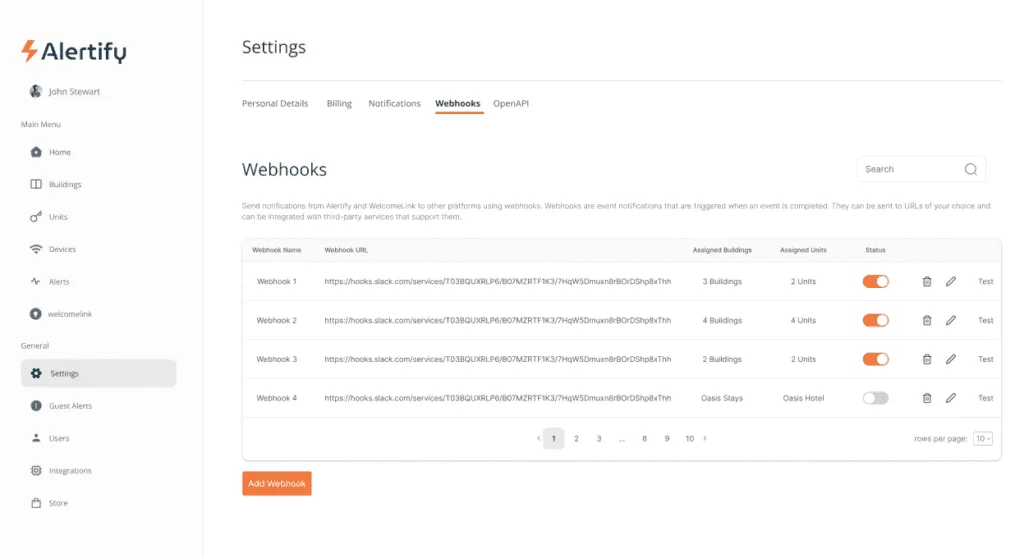
Our enhanced Webhooks feature now supports Targeted Webhook Assignments. Assign webhooks to specific buildings and units, ensuring you only receive webhook notifications for designated properties.
This is ideal for team-specific notifications to platforms like Microsoft Teams or Slack, enabling efficient, focused communication. Property managers handling multiple clients can route notifications to different team channels based on property ownership, ensuring the right people see the right alerts.
The benefit? Eliminate notification noise and ensure critical alerts reach the right team members instantly.
Why This Update Matters
This comprehensive dashboard redesign represents months of development guided by one principle: listening to you. Every feature was designed based on customer feedback to solve real problems you face every day.
- For solo hosts, these tools eliminate tedious manual work and give you professional-grade capabilities that help you compete with larger operators.
- For property managers, the new Users feature, Buildings Management, and enhanced notifications provide the infrastructure you need to manage portfolios efficiently while maintaining quality standards.
- For growing businesses, seamless integrations, streamlined ordering, and scalable settings management mean you can expand without administrative burden multiplying with each new property.
Getting Started with Your New Dashboard
All these features are live in your Alertify Dashboard right now. Log in to explore the new interface, customize your workspace, and discover how these tools can transform your property management workflow.
Ready to get started?
Login to your Alertify dashboard now
Have questions about the new features? Contact our support team at support@alertify.ioor visit our Help Center for detailed guides and tutorials.